Manage the Zendrive Trip Lifecycle
The Zendrive architecture helps you get a bird's eye view on how the Zendrive platform works and all the features and functionalities it provides. Below is the high-level system diagram of the Zendrive Android architecture.
Automatic Trip Lifecycle
The Zendrive SDK automatically detects trips and provides a number of events to the registered event listeners. Each listeners will be provided with event data which can be used to implement your business logic. The image below shows the anatomy of an automatic trip
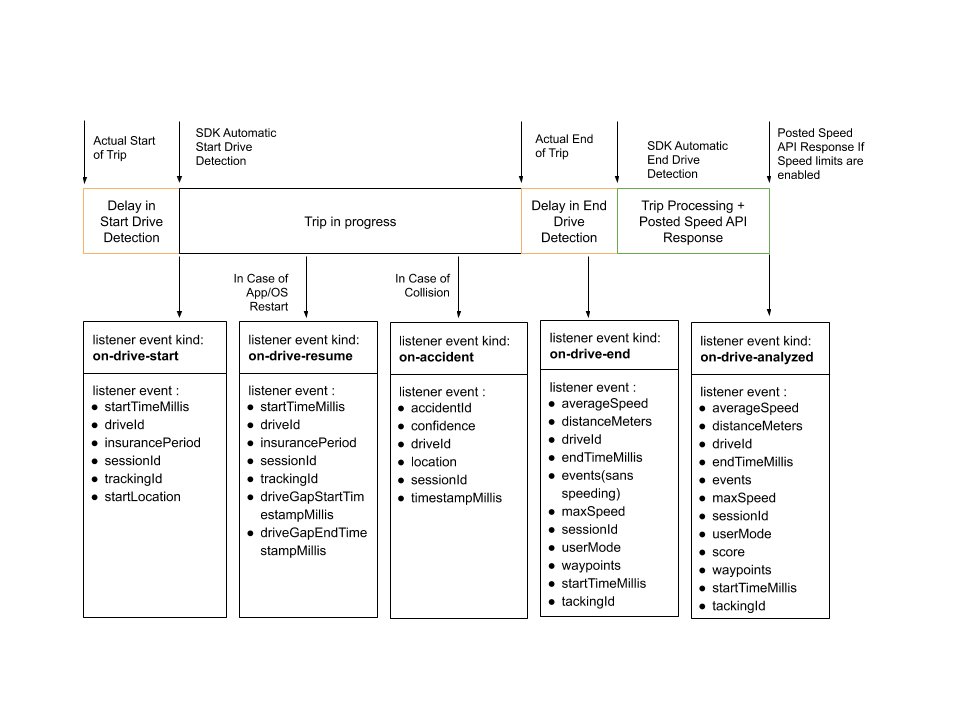
The lifecycle comprises the following:
- The user starts driving. The user may be driving themselves or be a passenger.
- The SDK detects that a trip has started and the registered event listener is called with an event of kind 'on-drive-start'.
- If the OS kills the app or the device restarts, the SDK resumes the trip and the registered event listener is called with an event of kind 'on-drive-resume'.
- In case there is a collision, the registered event listener is called with an event of kind 'on-accident'. You must apply your own business logic using the data returned.
- The user stops driving. The SDK detects that the trip ends and the registered event listener is called with an event of kind 'on-drive-end'.
- After the trip end event is notified, the SDK takes time to process the trip. After processing, the registered event listener is called with an event of kind 'on-drive-analyzed'
In each of these cases you may implement your own business with given data.
Note:
In case of extended delays i.e. any delay beyond 5 minutes, the SDK may not notify 'on-drive-resume'. Instead, it notifies 'on-drive-end'.
Manual Trip Lifecycle
In a manual trip, your app uses the startDrive and stopManualDrive methods to initiate and end trip detection. See Manual Trip Tagging for more.
The Zendrive SDK provides a number of events to the registered event listeners during trip lifecycle. Each listeners will be provided with event data which can be used to implement your business logic. The image below shows the anatomy of an automatic trip
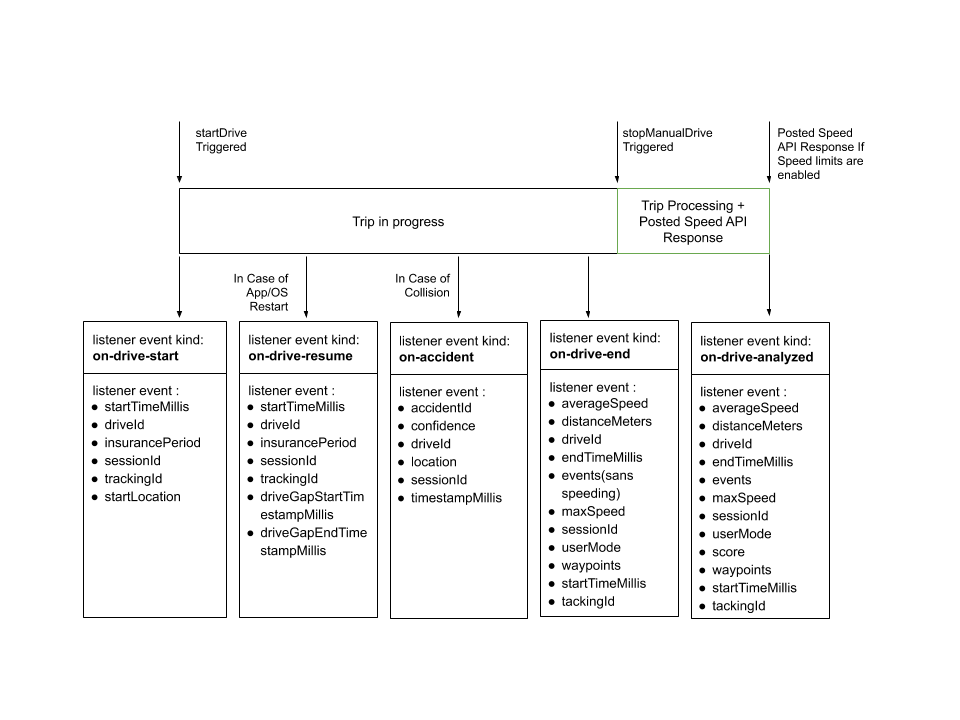
The lifecycle comprises the following:
- Your app calls the
startDrivemethod to start a trip. The registered event listener is called with an event of kind 'on-drive-start'. - If the OS kills the app or the device restarts, the SDK resumes the trip and the registered event listener is called with an event of kind 'on-drive-resume'.
- In case there is a collision, the registered event listener is called with an event of kind 'on-accident'. You must apply your own business logic using the data returned.
- Your app calls the
stopManualDrivemethod to end the trip. The registered event listener is called with an event of kind 'on-drive-end'. - After the trip end event is notified, the SDK takes time to process the trip. After processing, the registered event listener is called with an event of kind 'on-drive-analyzed'
In each of these cases you may implement your own business with given data.
Note:
In the case of a manual trip, the SDK will never notifiy 'on-drive-end' method on its own, even on device restart. You must call 'stopManualDrive' to trigger a trip end.